array([ 0.0123291 ,  0.20410156, -0.28515625,  0.21679688,  0.11816406,
        0.08300781,  0.04980469, -0.00952148,  0.22070312, -0.12597656],
dtype=float32)Module 1: Foundations of Generative AI
Module Objectives
- Explore the history of vector embeddings and tokenization
- Understand the transformer architecture at a high level
- Use our first transformer to translate language
- Cover a brief history of early generative transformers
- Setup and use Colab, and become familiar with the basics of notebooks and Python (if you haven’t used them already)
Let’s Rewind To 2013…
Rewind To 2013
- NLP (Natural Language Processing) was the thing!
- Sentiment analysis, named entity recognition, parsing, etc.
- But, you had limited options…
- One-hot encoding
- Hand crafted features
- Neural language models
2013: Word2Vec Released
- Word2Vec introduced by Mikolov and colleagues at Google Research in two papers
- Skip-gram and Continuous Bag-of-Words (CBOW) (Mikolov, Chen, et al. 2013)
- Negative sampling and subsampling techniques (Mikolov, Sutskever, et al. 2013)
- Paradigm shift from count-based methods
- Used Neural Networks (NNs) to predict words vs. large matrices
- Foundation for modern NLP tasks
How does Word2Vec Work?
- Word Embeddings are meaningful numerical representations of words
- Representations where words are encoded into multi-dimensional space
- Large number of dimensions (200-500 is typical)
- Similar words have similar numbers
How does Word2Vec Work?
How does Word2Vec Work?
How does Word2Vec Work?
Why Do This?
- Mapping words to multi-dimensional vectors enables
- Test for similarity
- Compute similarity
- Perform vector arithmetic
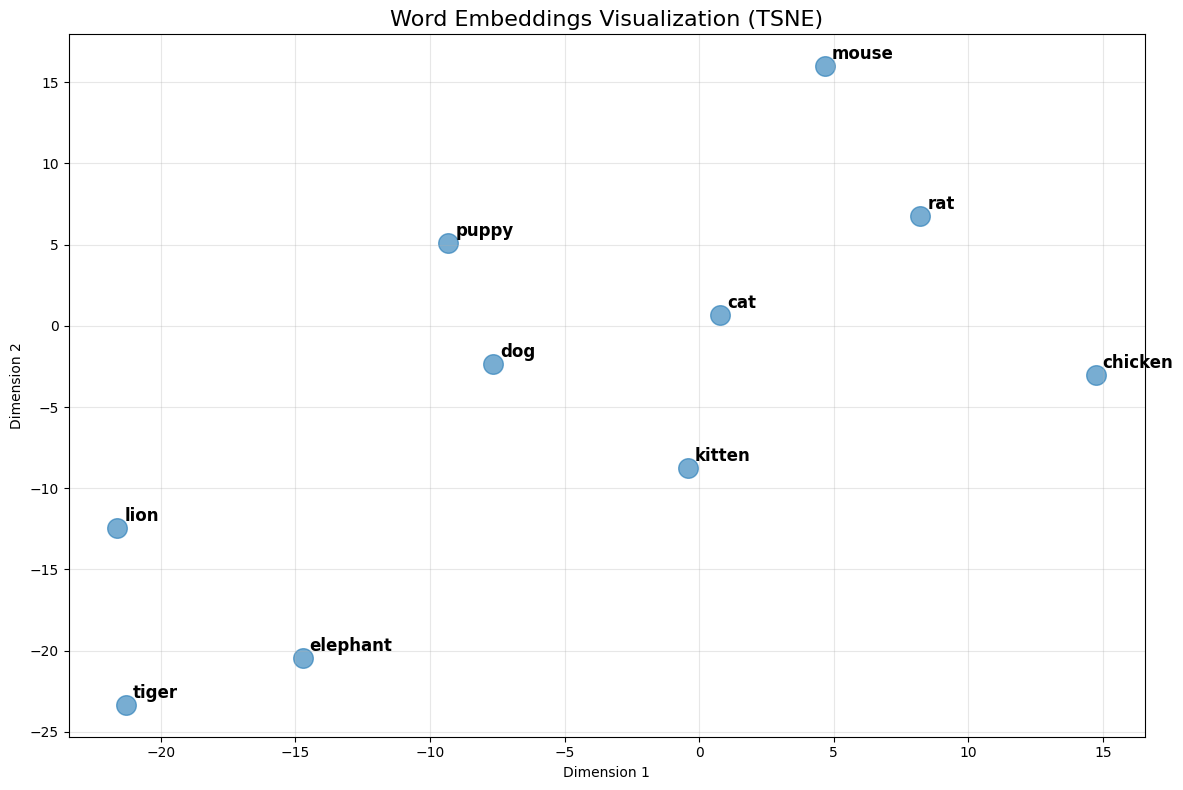
- Explore sets of words through visualizations
How does Word2Vec Work?
Words most similar to 'cat':
----------------------------------------
cats                 | similarity: 0.8099
dog                  | similarity: 0.7609
kitten               | similarity: 0.7465
feline               | similarity: 0.7326
beagle               | similarity: 0.7151
puppy                | similarity: 0.7075
pup                  | similarity: 0.6934
pet                  | similarity: 0.6892
felines              | similarity: 0.6756
chihuahua            | similarity: 0.6710

Words most similar to 'dog':
----------------------------------------
dogs                 | similarity: 0.8680
puppy                | similarity: 0.8106
pit_bull             | similarity: 0.7804
pooch                | similarity: 0.7627
cat                  | similarity: 0.7609
golden_retriever     | similarity: 0.7501
German_shepherd      | similarity: 0.7465
Rottweiler           | similarity: 0.7438
beagle               | similarity: 0.7419
pup                  | similarity: 0.7407

Words most similar to 'pizza':
----------------------------------------
pizzas               | similarity: 0.7863
Domino_pizza         | similarity: 0.7343
Pizza                | similarity: 0.6988
pepperoni_pizza      | similarity: 0.6903
sandwich             | similarity: 0.6840
burger               | similarity: 0.6570
sandwiches           | similarity: 0.6495
takeout_pizza        | similarity: 0.6492
gourmet_pizza        | similarity: 0.6401
meatball_sandwich    | similarity: 0.6377
How does Word2Vec Work?
Similarity between 'cat' and 'dog': 0.7609
Similarity between 'cat' and 'kitten': 0.7465
Similarity between 'cat' and 'car': 0.2153
Similarity between 'doctor' and 'hospital': 0.5143
Similarity between 'king' and 'queen': 0.6511
How does Word2Vec Work?
king + woman - man:
--------------------------------------------------
queen                | similarity: 0.7118
monarch              | similarity: 0.6190
princess             | similarity: 0.5902
crown_prince         | similarity: 0.5499
prince               | similarity: 0.5377

Paris + Italy - France:
--------------------------------------------------
Milan                | similarity: 0.7222
Rome                 | similarity: 0.7028
Palermo_Sicily       | similarity: 0.5968
Italian              | similarity: 0.5911
Tuscany              | similarity: 0.5633

walking + swim - walk:
--------------------------------------------------
swimming             | similarity: 0.8246
swam                 | similarity: 0.6807
swims                | similarity: 0.6538
swimmers             | similarity: 0.6495
paddling             | similarity: 0.6424
How does Word2Vec Work?
Let’s Get Into Some Code!
Python Primer
What is Python?
- Interpreted language (vs. compiled like C++ or C#)
- No compilation step - code runs directly
- Interactive and flexible, great for experimentation
- Created by Guido van Rossum in 1991
- Python 2 (2000-2020), Python 3 (2008-present)
- We’ll use Python 3.13
- Cross-platform: Runs on Windows, macOS, Linux
- Dynamically typed: No need to declare variable types
- The language of AI/ML: Vast ecosystem of libraries (NumPy, TensorFlow, PyTorch, Transformers)
Variables and Data Types
- Variables store data (no type declaration needed)
x = 42(integer)name = "Alice"(string)pi = 3.14(float)
- Lists hold multiple values
numbers = [1, 2, 3, 4, 5]words = ["cat", "dog", "bird"]
- Access with square brackets:
numbers[0]returns1
Functions
- Functions perform actions
- Built-in:
print("Hello"),len([1, 2, 3]) - Define your own:
def greet(name): return f"Hello {name}" - Indentation vs. braces
- Support for classes (although used rarely in AI/ML)
- Built-in:
Libraries and Packages
- Libraries extend Python’s capabilities
import math- mathematical functionsfrom transformers import AutoModel- import specific components
- Use dot notation to access:
math.sqrt(16) - Package management
pip- standard package installer (similar to NuGet for C#)uv- modern, faster alternative to pip- PyPI (Python Package Index) - central repository with 500K+ packages
Introducing Notebooks
What is a Notebook?
- An interactive document that combines:
- Live code that can be executed
- Rich text explanations (markdown)
- Visualizations and outputs
- Think of it as a computational narrative
- Tell a story with code, data, and explanations
- Originally designed for data science and research
- Also used for learning, experimenting, and sharing results
A Brief History of Notebooks
- 2011: IPython Notebook project begins
- Interactive Python shell → web-based notebook
- 2014: Renamed to Jupyter (Julia, Python, R)
- Now supports 40+ programming languages
- Python is most popular by far
- 2017: Google launches Colab
- Free cloud-based Jupyter notebooks
- Free access to GPUs and TPUs
- Today: Industry standard for ML/AI development
Anatomy of a Python Notebook
- Format: Extension is .ipynb
- JSON format, using Jupyter Document Schema
- Cells: Building blocks of notebooks
- Code cells: Executable Python code
- Markdown cells: Text, headings, images, equations
- Kernel: The computational engine running your code
- Maintains state between cell executions
- Outputs: Results appear directly below code cells
- Text, tables, plots, interactive widgets
How to Run Notebooks
- Jupyter Notebook Server (Classic approach)
- Web interface on localhost
- VS Code (Local development)
- Jupyter extension for VS Code
- Run on your own machine
- Google Colab (Recommended)
- Browser-based, no installation needed
- Free(-ish) GPU access
- Can also access local GPU
Why Recommend Google Colab?
- Access to GPUs and TPUs for AI-based tasks
- e.g., A100 and H100 with 40Gb/80Gb VRAM
- Model downloaded between cloud vendors
- vs. downloading large models via the DigiPen network
- Many libraries pre-installed
- Easy to share notebooks with others
- Generous (free) GPU limits for students!
Demo
Hello World and Word2Vec notebooks in Colab and VS Code
Hands-On
Setup Colab, get the two notebooks up and running (hello-world, word2vec)
Challenges with Word Embeddings
Challenges with Word Embeddings
- Large vocabularies
- 100K+ words
- And not particularly friendly to non-English vocabularies
- Little representation between certain words
- “Run” and “Running” should be related
- Lack of context
- Embedding for the word “bank” is the same, regardless of context
- River bank != Savings bank
Challenges with Word Embeddings
- Some researchers tried character-level models
- Small vocabulary (26 letters + punctuation for English)
- But very long sequences
- And hard to extract meaning
2016: Byte Pair Encoding (BPE)
- Originally developed in 1994 as a simple compression algorithm (Gage 1994)
- Frequent pairs of adjacent bytes represented as a single byte
- In 2016, adapted to neural machine translation (Sennrich, Haddow, and Birch 2016)
- Applied BPE to break words into subword units for better handling of rare words
2016: Byte Pair Encoding (BPE)
- Breaks words into frequent subword units (a.k.a. tokens)
- “unbelievable” → [“un”, “believ”, “able”]
- Balance between word level (large vocab) and character level (long sequences)
- Supports related words: [“Run”] and [“Run”, “ning”]
- 30-50K tokens vs. 100K, and works well for non-English languages
- Foundations of today’s tokenization
- API costs are measured in tokens
- Different models use different tokenizers
Search for Context
- BPE provided efficiency and representation between words
- But still didn’t solve context
- e.g., the River bank != Savings bank problem
- Researchers working on “attention tasks” using Recurrent Neural Networks (RNNs)
- Bahdanau et al. introduce attention for translation (Bahdanau, Cho, and Bengio 2015)
- Showed that focusing on relevant parts of input improved translation quality
2017: “Attention is all you need”
- Google researchers publish “Attention is all you need” (Vaswani et al. 2017)
- Introduced the Transformer a novel Neural Network (NN) architecture, eliminating the need for RNNs for sequence-to-sequence models
- Used BPE tokenization, and creates contextual embeddings during training process
- Attention mechanism allows the model to weigh the importance of words in a sequence
- Achieved State Of The Art (SOTA) performance on language translation, while also being faster to train
Introducing the Transformer
Introducing the Transformer
graph LR
    Input["Input: 'Bonjour, comment allez-vous?'"]
    Transformer[Transformer]
    Output["Output: 'Hello, how are you?'"]

    Input --> Tokenize --> Transformer --> Decode --> Output
Example
Example
tensor([8703,    2, 1027, 5682,   21,  682,   54,    0])
Tokens: ['▁Bonjour', ',', '▁comment', '▁allez', '-', 'vous', '?', '</s>']
Example
Example
Introducing the Transformer
graph LR
    Input["Input: 'Bonjour, comment allez-vous?'"]
    Transformer[Transformer]
    Output["Output: 'Hello, how are you?'"]

    Input --> Tokenize --> Transformer --> Decode --> Output
Introducing the Transformer
graph LR
    Input["Input: 'Bonjour, comment allez-vous?'"]

    subgraph Transformer
        Encoder[Encoder]
        Decoder[Decoder]
        Encoder --> Decoder
    end

    Output["Output: 'Hello, how are you?'"]

    Input --> Tokenize --> Encoder
    Decoder --> Decode --> Output
Introducing the Transformer
graph LR
    Input["Input: 'Bonjour, comment allez-vous?'"]

    subgraph Transformer
        direction LR
        subgraph "Encoder Stack (N layers)"
            E[Encoder<br/>Layers<br/>1...N]
        end

        subgraph "Decoder Stack (N layers)"
            D[Decoder<br/>Layers<br/>1...N]
        end

        E -.->|Context| D
    end

    Output["Output: 'Hello, how are you?'"]

    Input --> Tokenize --> E
    D --> Decode --> Output
How Does the Encoder/Decoder Work?
output_ids = model.generate(input_ids)
- Takes input ids, runs through encoder
- Generates contextual vectors using self attention across input tokens
- Runs the decoder iteratively to generate one token at a time
- Uses self attention on previously generated tokens
- Uses cross-attention to attend to encoder output
- Continues until it generates an end-of-sequence token or hits max length
Introducing the Transformer
graph LR
    Input["Input: 'Bonjour, comment allez-vous?'"]

    subgraph Transformer
        direction TB

        subgraph "Encoder Layer"
            direction TB
            E_SelfAttn[Multi-Head<br/>Self-Attention]
            E_AddNorm1[Add & Norm]
            E_FFN[Feed-Forward<br/>Network]
            E_AddNorm2[Add & Norm]

            E_SelfAttn --> E_AddNorm1 --> E_FFN --> E_AddNorm2
        end

        subgraph "Decoder Layer"
            direction TB
            D_SelfAttn[Masked Multi-Head<br/>Self-Attention]
            D_AddNorm1[Add & Norm]
            D_CrossAttn[Multi-Head<br/>Cross-Attention]
            D_AddNorm2[Add & Norm]
            D_FFN[Feed-Forward<br/>Network]
            D_AddNorm3[Add & Norm]

            D_SelfAttn --> D_AddNorm1 --> D_CrossAttn --> D_AddNorm2 --> D_FFN --> D_AddNorm3
        end

        E_AddNorm2 -.->|Encoder<br/>Output| D_CrossAttn
    end

    Output["Output: 'Hello, how are you?'"]

    Input --> E_SelfAttn
    D_AddNorm3 --> Output
Demo
Translation Transformer in Colab
Hands-On
Experiment with your own phrases in the translation-transformer.ipynb notebook
2018: Origin of “GPT”
2018: Origin of “GPT”
- Generative Pre-trained Transformer
- Name coined by OpenAI researchers in “Improving Language Understanding by Generative Pre-Training” (Radford et al. 2018)
What is a GPT?
- “Decoder-only” architecture
- Self attention is causal/masked - tokens can only attend to previous tokens, not future ones
- Pre-training objective: Next token prediction
- Trained on a massive text corpora
- Learns grammar, facts, reasoning patterns just from this objective
What is a GPT?
- Autoregressive generation
- Generates one token at a time, feeding back each output as input
- Temperature and sampling strategies
- Same prompt can produce different outputs
- Context window
- Fixed maximum length (2048 for GPT-2)
- Everything must fit within this window during generation
- Introduced the concept of “context” vs. “knowledge” (prompt vs. training)
GPT-2
- Released in 2019 by OpenAI
- Initially, only 117M param model released in Feb 2019 due to safety concerns
- Staged releases throughout the year, 1.5B in Nov 2019
- Trained on WebText, 8 million web pages/40GB of text
- Zero-shot task performance
- Did well on translation, summarization, and question answering without task-specific training
Example
Example
import torch

def autocomplete(prompt, max_length=50, temperature=0.7, top_k=50, top_p=0.9):
    # Encode the prompt with attention mask
    inputs = tokenizer(prompt, return_tensors="pt")

    # Generate continuation
    with torch.no_grad():
        output = model.generate(
            inputs['input_ids'],
            attention_mask=inputs['attention_mask'],
            max_length=max_length,
            temperature=temperature,
            top_k=top_k,
            top_p=top_p,
            do_sample=True,
            pad_token_id=tokenizer.eos_token_id
        )

    # Decode and return the generated text
    generated_text = tokenizer.decode(output[0], skip_special_tokens=True)
    return generated_text
Temperature, top_k, and top_p
- Temperature (0.0 - 1.0)
- Lower for accuracy, factual summaries, etc.
- Higher for more creative, diverse ideas
- top_k (top k tokens)
- Narrow the next tokens to the top k (ordered by probability)
- top_p (cumulative probability)
- Only return the top tokens whose cumulative probability < top_p
Example
Mary had a little lamb, and the young woman asked her for a little lamb, and they gave it to her.

"Oh, my child, it is good to have a little lamb," said he, "but it is not to be bought, for it is hard to make, and it is much more difficult to make.

"When you have a little lamb, it
Demo
GPT-2 notebook in Colab
Hands-On
Experiment with your own phrases in the GPT-2.ipynb notebook
Limitations of GPT-2
Limitations of GPT-2
- Hallucinations / factual errors
- No real-world grounding
- Repetition issues
- Onwards to GPT-3 and beyond…
Looking Ahead
Looking Ahead
- This week’s assignment!
- New to Python?
- Instruction-tuned models
- OpenAI specification
- Gradio for chat-based UIs
References
References
Bahdanau, Dzmitry, Kyunghyun Cho, and Yoshua Bengio. 2015. “Neural Machine Translation by Jointly Learning to Align and Translate.” In International Conference on Learning Representations. https://arxiv.org/abs/1409.0473.
Gage, Philip. 1994. “A New Algorithm for Data Compression.” The C Users Journal 12 (2): 23–38.
Mikolov, Tomas, Kai Chen, Greg Corrado, and Jeffrey Dean. 2013. “Efficient Estimation of Word Representations in Vector Space.” In International Conference on Learning Representations. https://arxiv.org/abs/1301.3781.
Mikolov, Tomas, Ilya Sutskever, Kai Chen, Greg S Corrado, and Jeff Dean. 2013. “Distributed Representations of Words and Phrases and Their Compositionality.” In Advances in Neural Information Processing Systems, 3111–19. https://arxiv.org/abs/1310.4546.
Radford, Alec, Karthik Narasimhan, Tim Salimans, and Ilya Sutskever. 2018. “Improving Language Understanding by Generative Pre-Training.” https://cdn.openai.com/research-covers/language-unsupervised/language_understanding_paper.pdf.
Sennrich, Rico, Barry Haddow, and Alexandra Birch. 2016. “Neural Machine Translation of Rare Words with Subword Units.” In Proceedings of the 54th Annual Meeting of the Association for Computational Linguistics (Volume 1: Long Papers), 1715–25. Berlin, Germany: Association for Computational Linguistics. https://doi.org/10.18653/v1/P16-1162.
Vaswani, Ashish, Noam Shazeer, Niki Parmar, Jakob Uszkoreit, Llion Jones, Aidan N Gomez, Łukasz Kaiser, and Illia Polosukhin. 2017. “Attention Is All You Need.” In Advances in Neural Information Processing Systems. Vol. 30.